
What This Guide Covers and How to Use It
Running a practice in 2026 means juggling more than ever. Staffing is tight, claim denial rates keep climbing, and regulations are ever-changing. On top of that, manual workflows are worsening these challenges and eating up hours your team doesn’t have. Healthcare leaders are turning to AI-powered systems to unlock a credible path to a well-run revenue cycle.
AI-powered practice management (PM) software streamlines your scheduling, billing, claims, and patient intake—catching errors before they cost you and lifting the busywork off your staff. A solution like CollaborateMD embeds AI right into the billing workflows you already know, so claims move faster, denials drop, and your team gets time back for what matters most.
This guide will illustrate the value of practice management and medical billing software solutions, explain how AI and automation work in a PM system, provide insight into the benefits you can achieve by partnering with a qualified vendor, and offer helpful tips for choosing the best practice management solution for your business.
Why Do You Need AI Practice Management Software?
In 2026, staffing shortages, rising denial rates, and shrinking reimbursements make manual, disconnected workflows costly. Tasks that should take minutes drag on for hours. Small errors slip through. Revenue slows down. Collectively, healthcare organizations spend more than $140 billion annually, with manual processes, fragmented vendor systems, and outdated technologies contributing to high costs, delays, and errors.
Staying manual is no longer sustainable for today’s practice. But adopting automation and AI is. Consider what changes with this technology.
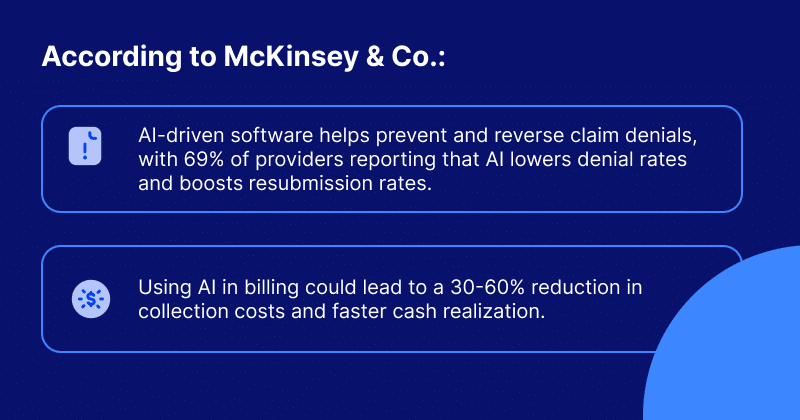
Your next thought may be: How is this possible? AI practice management software can handle tasks that normally take practices hours to do manually, streamlining everything from scheduling and billing to claims and intake. It fills open appointment slots, flags billing issues before they become denials, and surfaces the right information at the right moment.
But AI is only as good as the foundation beneath it. It needs clean data, digital workflows, and systems that actually talk to each other. The right AI-powered software gives your data a home, connects your systems, and turns scattered tasks into smooth workflows.
This is where CollaborateMD by EverHealth comes in. CollaborateMD embeds AI directly into the billing workflows you already use. It processes claims faster, reduces errors before they cost you, and cuts the manual effort that wears down your staff.
You keep billing the way you know. The AI simply makes it work better.
Automated Front-and-Back-Office Workflows
Implementing automated workflows eliminates manual eligibility checks, paper-based intake, and duplicate entry between EHR and billing systems. By automating appointment reminders, eligibility checks, patient intake, and AI-assisted claim submission, you can streamline front-and-back-office workflows, reduce duplicate work between teams, and move claims faster with fewer errors.
AI-Accelerated Revenue Cycle
Revenue-protecting capabilities such as AI-powered claim rejection support and automated denial management surface actionable insights and automate error detection. These tools help you gain visibility into workload, revenue bottlenecks, and aging medical claims. AI signals help teams prioritize tasks, so they can focus on what matters most.
Simplified EHR Integration
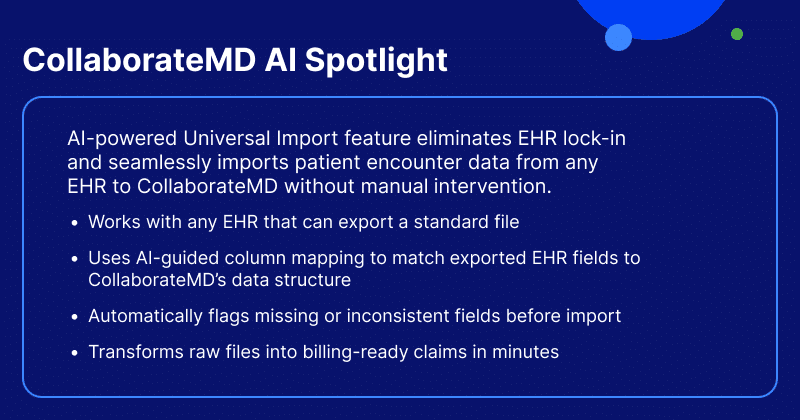
Seamlessly integrating your practice management software and EHR gives you access to more patient data, strengthening your revenue cycle and clinical workflows. AI-powered Universal Import technology takes it further by eliminating lock-in, so patient and claims data flow from any EHR without manual mapping.
Streamlined Coding and Claim Submission
Spend less time interpreting payer codes and searching for missing data. AI surfaces what you need, when you need it. AI-powered Intelligent Claim Rejection Support translates payer rejection codes into plain-language explanations with clear next steps. Owned clearinghouse scrubbing with payer-specific rules reduces rejections by catching errors before submission, delivering cleaner first-pass claims.
Improved Claim Tracking and Denial Management
Track every claim from submission through payment in one centralized workflow. Gain real-time visibility into claim status, unpaid balances, and follow-up priorities so nothing gets overlooked, revenue stays on track, and you receive timely reimbursement. AI-powered denial prioritization, automated ERA posting, intelligent claim workflows, and trend reporting help practices reduce denials, identify root causes, and process more claims.
Enhanced Financial Reporting and Real-Time Analytics
Advanced real-time dashboards, automated accounts receivable (A/R) alerts, and custom reporting allow you to generate financial reports and pull data to analyze your practice’s fiscal health. Automatically track claim acceptance, payments, and performance metrics as they happen. This helps you identify areas for improvement in your revenue cycle, turning data into actionable insights that boost your bottom line.
Improved Patient Experience
Make appointment scheduling easy, generate and send patients balance statements, and predetermine out-of-pocket costs before appointments. Engaging patients at every step helps them stay involved with their care and improves the experience. Automated reminders reduce no-shows, digital check-in speeds up intake and shortens wait times, and cost estimates give patients clear pricing upfront, creating a smoother experience.
AI & Automation in Practice Management — What to Know Before You Buy
AI adoption is skyrocketing and reshaping practice management software by handling specific, repeatable jobs faster and more accurately than manual effort. More than 80% of physicians use AI professionally in 2026, with many using it in PM for billing and coding, administrative tasks, workflow efficiency, and patient convenience. It is most used in four key practice management areas.
First, pattern recognition scans your claims before they go out. It catches errors early, so you face fewer rejections. Second, natural language processing (which enables computers to understand, interpret, and generate human language) reads payer rejection codes for you. It explains what went wrong in plain terms.
Third, automated data mapping moves information between systems. You skip the tiresome re-entry from your EHR. It spots trouble before it grows. Together, these AI tools help you get paid faster and stress less.
Good AI doesn’t replace your judgment. It removes the tedious, time-draining steps so you and your team can focus on patients.
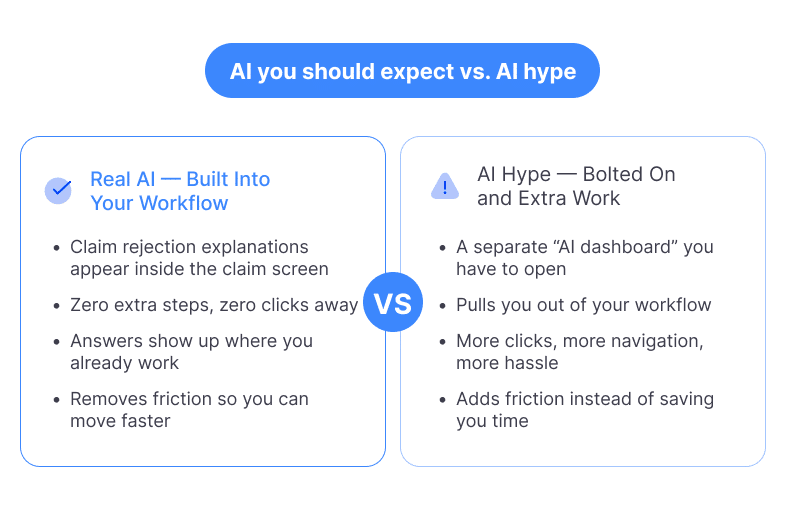
Workflow-Native AI vs. Bolted-On AI Features
The difference between workflow-native AI and bolted-on AI matters more than most practices realize—it directly impacts daily operations, efficiency, and the reliability of your entire system.
Workflow-native AI is built into the system from the ground up and lives within your workflow. It understands the full picture—your scheduling, charting, billing, and reporting all connect.
Bolted-on AI is added to an existing system, often via plugins or third-party integrations. It can be useful, but it exists outside your core workflow. That separation can create friction: data has to be passed back and forth, and the experience feels stitched together rather than smooth.
When you evaluate a system, ask a simple question: Is the AI woven into the workflow, or sitting on top of it? The answer tells you a lot about how the tool will actually feel day to day.
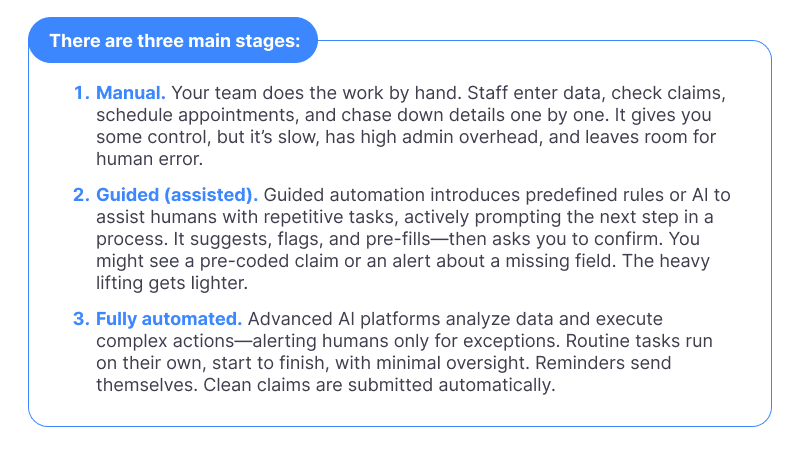
The Automation Maturity Spectrum: Manual → Guided → Fully Automated
Automation is a journey, and every practice sits somewhere along it. Understanding this spectrum helps you set realistic expectations and choose a system that can grow with you.
When searching for a practice management system, look for one that meets you where you are and supports where you’re headed. With the right understanding of what AI does, how it’s built, and where you sit on the automation spectrum, you can choose a system that truly works for you.
What Features Do You Need in Practice Management Software?
Choosing and integrating a well-supported and compliant system can be challenging. The next step in evaluating PM software is to verify that the functions and features listed below are available, easy to learn, and scalable for your practice.
But here’s what really sets the best practice management software apart in 2026: how intelligent and automated it is.
We break down the functions and features into Baseline vs. Enhanced Features (Automated and AI-powered) categories, along with what to look for in each.
Patient Demographics & Registration
Baseline: Automated verification tools accurately confirm patient information, preventing claim denials and rejections. Information should flow seamlessly into claims to reduce duplicate entry.
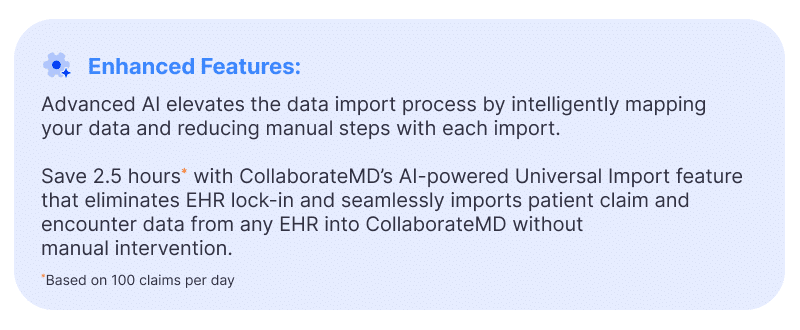
Enhanced Features: Automated digital intake forms capture insurance information and patient demographics before visits, eliminating manual tasks and follow-up collection. CollaborateMD offers an AI-powered Universal Import feature that imports patient encounter data from any EHR into CollaborateMD without manual intervention.
Appointment Scheduling, Automated Reminders & Waiting List
Baseline: Software schedules and manages patient visits.
Enhanced Features: Smart scheduling sends automated SMS and email reminders based on patient preferences. If someone cancels, waitlist management instantly texts the next patient on the waitlist to fill the slot. CollaborateMD sends automated reminders via phone, text, or email to reduce no-shows. This turns scheduling from a passive tool into an active revenue-protection mechanism.
Real-Time & Batch Eligibility Verification
Baseline: Standard features enable you to determine patients’ financial responsibility for collections at the point of care. This lets you collect copays and deductibles upfront.
Enhanced Features: Best-in-class batch eligibility checking runs automatically before appointments, not reactively with one-at-a-time lookups. The system should also proactively surface patient financial responsibility. CollaborateMD offers real-time insurance eligibility verification and patient estimates before appointments, enabling time-of-service collections.
Claim Submission
Baseline: Software submits claims electronically and in real time, providing status updates
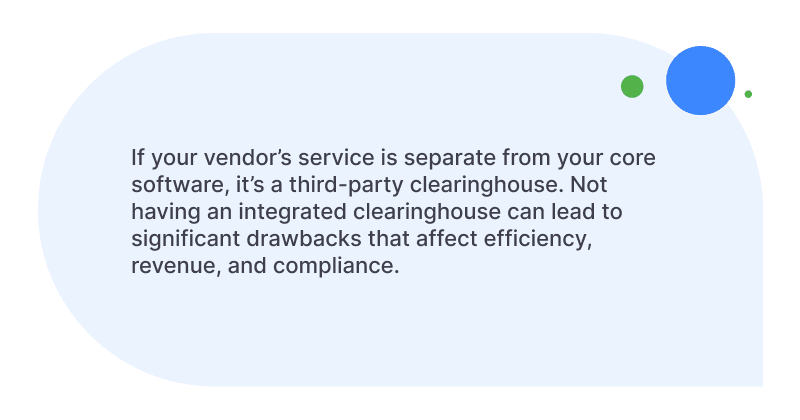
within seconds of submission. This is a basic expectation, not a premium feature, and often comes in the form of a third-party clearinghouse.
Enhanced Features: An automated, integrated clearinghouse ensures your claims bypass common bottlenecks entirely. CollaborateMD’s owned clearinghouse integrates scrubbing, submission, and tracking into a single workflow, delivering speed and reliability.
Claim Generation with Automated Scrubbing
Baseline: Software allows you to create claims, enter charges, and perform basic checks for billing and coding errors.
Enhanced Features: AI-powered scrubbing flags high-risk claims before submission, not after rejection. CollaborateMD’s Level 2 Claim Edits check for issues related to CCI, NCD/LCD, LMRP, and modifiers. Your team can inspect and fix errors before claims ever leave your system.
AI-Powered Claim Rejection Support
Baseline: Basic software tells you when a claim is rejected and why.
Enhanced Features: AI can decipher payer codes. CollaborateMD’s Intelligent Claim Rejection Support translates confusing payer codes into plain language. It offers clear next steps right inside your claim workflow, without requiring the biller to look up codes manually.
Claim Follow-Up & Tracking
Baseline: Software lets you follow individual claims and monitor their progress with the insurer. When a claim is denied, you should be able to resubmit it with suggested edits.
Enhanced Features: Smart tracking keeps revenue moving by prioritizing your workflow. CollaborateMD provides real-time claim status tracking across the full lifecycle. It offers intelligent claim workflows, custom worklists, and robust audit trails to prevent missed payments, reduce denials, and process more claims.
Patient Statements Creation & Integrated Patient Payments
Baseline: Software creates and sends automated patient statements to cover the balance.
Enhanced Features: Automated systems meet patients where they are—delivering statements digitally with convenient payment options that reduce friction and accelerate collections.
CollaborateMD offers an integrated patient payment tool that automatically generates and delivers statements via email, text, or mail with one-click payment links. It also provides upfront responsibility estimates and flexible payment options.
Denial Management
Baseline: Software manages denials by automating the tracking, identification, and appeal of rejected claims.
Enhanced Features: A modern system should have a structured denial management workflow—not just the ability to resubmit claims. CollaborateMD offers automated denial categorization, worklist prioritization, and trend reporting to identify root causes. This helps practices reduce administrative workload by providing AI-driven rejection explanations, intelligent worklists, and extensive reporting to maximize first-pass acceptance rates.
Payment Posting & ERA Auto-Posting
Baseline: Manual posting is outdated. Software allows payments to post directly within the system for automatic payment reconciliation.
Enhanced Features: An advanced system automatically reads Electronic Remittance Advice (ERA) documents. CollaborateMD’s ERA Auto-Posting applies payments automatically and flags discrepancies or underpayments for review.
Reporting, Real-Time Dashboards & KPI Analytics
Baseline: Standard software generates and builds performance reports. Key reports include accounts receivable, KPI reports (charges, collections, adjustments, and patient encounters), and insurance payer reports.
Enhanced Features: Advanced dashboards forecast future revenue trends. CollaborateMD offers robust KPI analytics with drill-down capability and features more than 125 customizable dashboards with drag-and-drop fields and filters. These tools reveal denial patterns, payer bottlenecks, and revenue leakage in real time.
AI-Powered EHR Data Import
Baseline: Basic software tools turn unstructured documents into clear, usable information. Look for automated mapping that translates seamlessly into standard data fields. Ensure direct EHR write-back to minimize manual entry.
Tips on Selecting the Right Practice Management Software
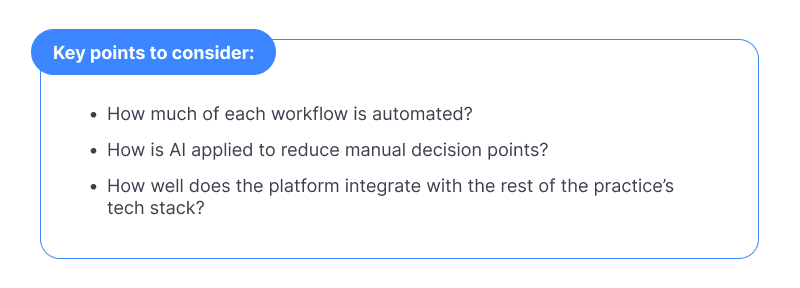
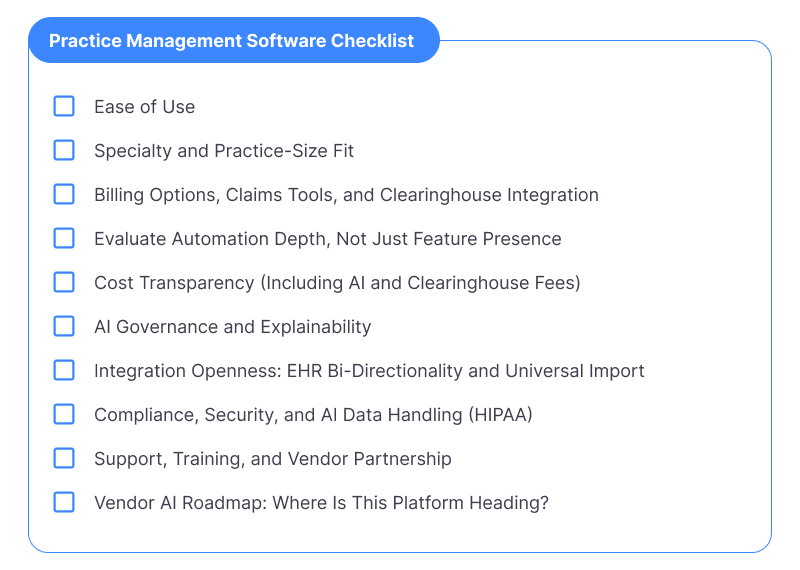
When selecting practice management software, keep these factors in mind. Along with creating a specific list of required features and billing capabilities, also look for “automation maturity” as a vendor differentiator—that is, how deeply each feature is automated. Consider the following to compare vendors.
Ease of use
Ensure the practice management software is easy to use and can accommodate your practice and specialty. Evaluate whether AI-powered features are embedded in existing workflows (e.g., AI rejection explanations appearing inside the claim screen) or require users to seek out a separate AI module.
Billing and claims tools
When evaluating practice management software, look for clearinghouse integration depth, automated claim scrubbing intelligence, AI-assisted rejection resolution, and denial management workflow automation. These are now table stakes for evaluation, not differentiators to be checked off.
Automation depth
Vendors will claim they offer eligibility verification, claim scrubbing, and payment posting features. But what is their automation maturity? Consider how much of this requires a staff member to initiate, monitor, or complete. A truly automated system runs eligibility in batch before a patient arrives, posts ERAs without manual intervention, and surfaces rejection explanations without requiring the biller to leave their workflow.
Cost
Be aware of hidden fees or upfront payments required before setting up the solution. This should include AI and clearinghouse fees.
AI governance
As AI becomes embedded in billing decisions, practices need to understand how AI recommendations are generated and validated. Ask vendors: can users see why a particular action was suggested? Is there an audit trail? This is increasingly relevant for HIPAA compliance and payer audits.
Integration
Practices don’t run on a single platform. Evaluate whether the PM system integrates with your specific EHR — and whether that integration is a two-way, real-time data flow or just a periodic export. Ask if the vendor supports AI-powered data import from any EHR, not just named partners. You’ll also want to ensure that an interface can be built or already exists for seamless EHR/EMR integration.
Reporting, security, and compliance
Carefully review reporting features; the tool should help you boost the practice’s performance across functions. Confirm compliance and security. Confirm the vendor provides adequate support and training. An AI-specific compliance tip to keep in mind: data used to train or inform AI models should never leave your HIPAA-compliant environment.
Vendor partnership and AI roadmap
Validate the vendor’s reputation. Look for a partner who will work hard to make your solution a success. Look beyond references and testimonials and ask candidates specifically about their AI development roadmap. The practice management software market is evolving rapidly; a vendor who isn’t actively building AI into their product today will be behind in 12–18 months.
Practice Management Software Buyer’s Checklist & Evaluation Scorecard
When researching and purchasing a PM and medical billing solution, these are the key considerations. Answering the following essential and granular questions will lay the foundation for an informed selection process.
Core Features
- Appointment Scheduling
- Eligibility Verification
- Claim Submission
- ERA & Payment Posting
- Claim Follow-Up & Tracking
- Patient Statements
- Reporting & Analytics
AI & Automation
AI-Powered Claim Rejection Support
Does the system offer AI-powered claim rejection support with plain-language explanations embedded in the claim workflow?
▢ Universal/AI-Powered EHR Data Import
Does it include AI-powered EHR data import (Universal Import)? Is it able to bring data from any EHR without manual mapping?
▢ Automated ERA Posting
Does it offer automated ERA posting without manual staff intervention?
▢ Automated Batch Eligibility
Does it run batch eligibility checks automatically before appointments?
▢ Denial Management Automation
Is denial management automated with worklist prioritization and root cause reporting?
▢ Automated Appointment Reminders
Are appointment reminders automated via text/SMS with patient confirmation?
Integration & Interoperability
▢ EHR/EMR integrations (named partners + open import)
What EHR/EMR systems does the vendor integrate with natively? Can it import patient and claims data from EHRs not on the named partner list?
▢ Bi-directional data flow
Is integration bi-directional and real-time?
▢ Owned Clearinghouse
Does the vendor own its clearinghouse, or rely on a separate third-party system?
Vendor Evaluation
▢ Sales model
Are we buying directly from you or through a reseller?
▢ Cloud vs. installed
Is the software cloud-based or installed on-site? Which is better for us?
▢ Billing type support
Does the platform support claim formats, including CMS-1500 and UB-04, and specific payers?
▢ References, testimonials, and AI
Can you speak with customers who have a practice size/specialty similar to yours? What is your AI development roadmap?
▢ Data migration
How will you help us migrate data into your system? What does your onboarding and training process look like?
▢ Upgrade model
Are software upgrades/new features included in our subscription or contract, or require an additional purchase down the road?
Support & Training
▢ Onboarding
Is onboarding included, and what does it cover?
▢ Support team
Is there a dedicated support team or ticket-queue model?
▢ Support resolution
How quickly do support issues related to claim rejections get resolved?
Cost & Compliance
▢ Total cost and pricing model
Is pricing per-provider, per-claim, or flat fee?
▢ AI/automation features
Are AI features included or priced as add-ons?
▢ Clearinghouse fees as add-ons?
Are clearinghouse fees bundled or separate?
▢ HIPAA compliance
How does your platform safeguard protected health information (PHI)?
▢ AI data governance
Can a staff member see why an action was suggested? Is there an audit trail?
Implementing the right practice management and medical billing software can transform your revenue cycle in just a few months. As practices grow and patient volume increases, it becomes critical to streamline processes and achieve a high first-pass resolution rate.
Medical claim rejections and denials can be the most significant challenge for a physician’s practice. According to Experian Health’s State of Claims 2025, more than 40% of providers report that at least one in ten claims is denied—and denial rates are still rising. AI practice management software provides the tools you need to take control of the entire billing cycle. It validates claims before submission, uncovers denial trends, and prevents recurring issues, helping you act faster and reduce rejections. By pinpointing and addressing problems earlier, you protect your revenue while saving valuable time and resources.
Since practice management software covers vital parts of your business, it can either elevate your practice or hold you back. To ensure success, it’s critical to choose the right software for your staff and workflow. CollaborateMD seamlessly integrates AI into your existing billing and operational workflows, speeding up claims, reducing costly errors, and easing your team’s admin burden. You stick to the processes you know—AI just makes them smarter and more efficient.
Want to see these features in action?
Schedule a demo with CollaborateMD and discover how intelligent billing software can transform your practice, without the stress of starting over.